Comprehensive Fleet Vehicle Management System
Track complete vehicle inventory with real-time GPS, automate maintenance schedules, bulk upload vehicles, monitor health metrics, and generate comprehensive reports. Complete fleet visibility that reduces costs by 40% and increases utilization by 30%.
40%
Cost Savings
$12K+
Per Vehicle/Year
30%
Better Utilization
Real-Time
GPS Tracking
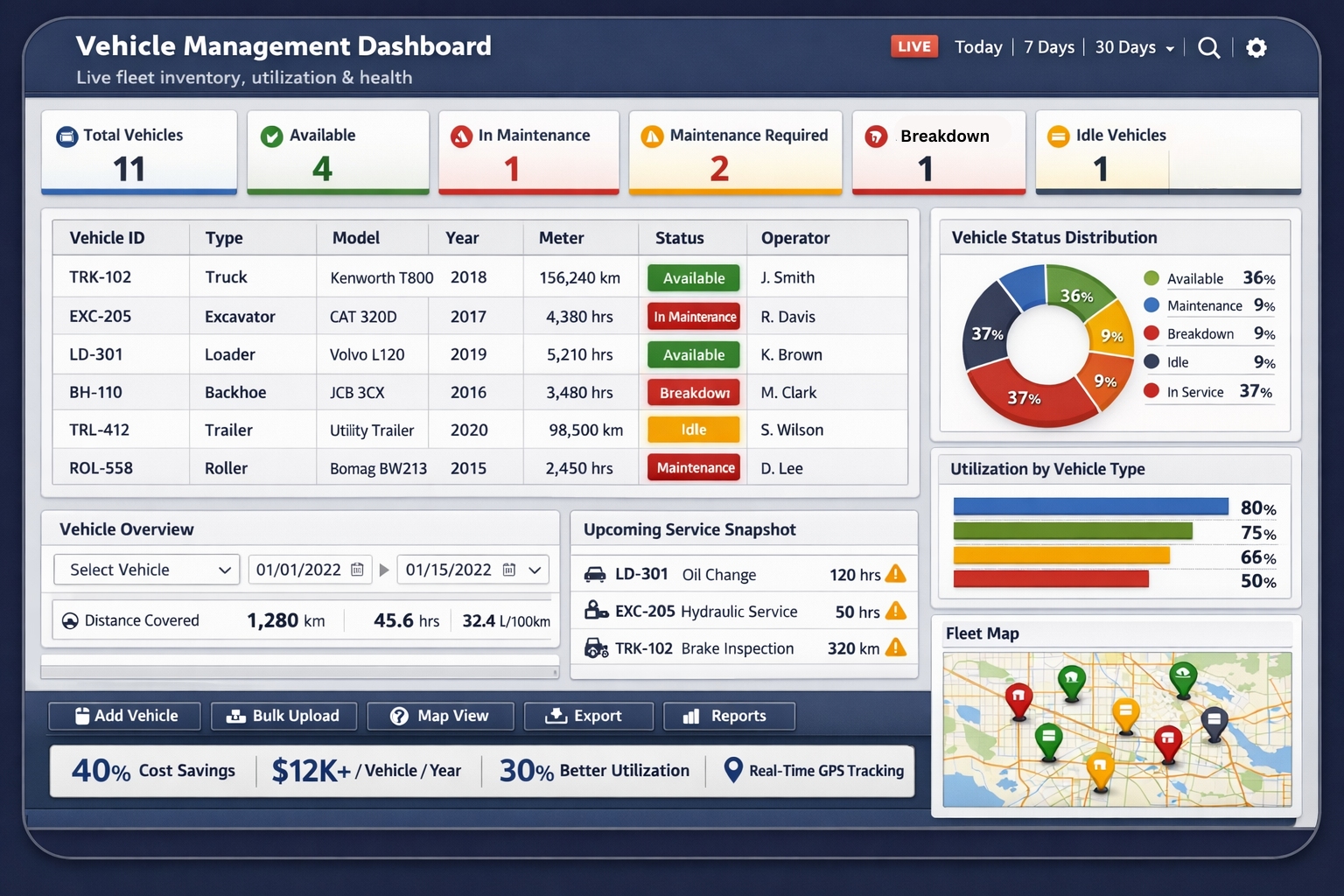
Complete Vehicle Management Platform
From inventory tracking to GPS monitoring, automated maintenance to bulk operations - manage your entire fleet efficiently
Vehicle Inventory Dashboard
Centralized inventory with 8 real-time KPI cards: total vehicles, available, in maintenance, maintenance required, breakdowns, idle vehicles, unique models, and categories. Instant visibility into fleet status with color-coded metrics and status badges.
- 8 real-time KPI cards
- Status-based filtering
- Vehicle images & details
- Searchable & sortable table
GPS Location Map View
Real-time GPS tracking with interactive map view. See all vehicle locations at once. Click any marker for vehicle details, status, and location history. Filter by status or category. Geofence alerts. Route playback. Identify idle or unauthorized vehicles instantly.
- Interactive map interface
- Real-time location updates
- Vehicle status markers
- Route history & geofencing
Bulk Vehicle Upload
Import hundreds of vehicles instantly from Excel/CSV. Download pre-built template with all fields. Automatic data validation before import. Update existing vehicles in bulk. Map fields automatically. Error checking ensures data quality. Add your entire fleet in minutes, not hours.
- Excel/CSV templates
- Data validation & preview
- Bulk create & update
- Import progress tracking
Export Reports
One-click Excel export of complete vehicle inventory with all details. Generate custom reports with filters. Export to PDF or Excel. Schedule automated reports. Include vehicle photos, documents, and history. Perfect for management review, audits, insurance, or backup.
- One-click Excel export
- Customizable report formats
- PDF & Excel options
- Scheduled reports
Vehicle Overview Summary
Complete 360° vehicle profile with 11 tabs: Overview, Meter History, Inspections, Work Orders, Tires, Schedule, Incidents, Fuel Logs, Documents, Checklists, Daily Reporting. Track maintenance costs, fuel consumption, running hours, issue reports, and work order summaries all in one place.
- 11 detailed tabs
- Complete vehicle history
- Cost analytics & KPIs
- Issue & work order tracking
Assign Inspection Checklists
Assign custom inspection checklists when adding vehicles. Different checklists for different vehicle types. Operators complete mobile inspections. Failed items auto-create work orders. Track compliance rates by vehicle. Require geo-location during inspection. Complete audit trail with photos and signatures.
- Custom checklist assignment
- Mobile inspection completion
- Auto work order creation
- Geo-location verification
Complete Feature Set
- Unlimited vehicle profiles
- Custom categories & models
- VIN & license tracking
- Meter readings (miles/hours/km)
- Operator assignments
- Site/project tracking
- Asset value & depreciation
- Purchase & warranty dates
- Ownership modes (owned/leased)
- Registration & expiry tracking
- Photo & document storage
- Maintenance priority levels
- Custom fields & tags
- Vehicle utilization goals
- GPS device integration
- Status management (9 statuses)
- Business unit tracking
- Notes & annotations
- Advanced search & filters
- Role-based permissions
- Mobile app access
Measurable Results Across Your Fleet
Real impact from comprehensive vehicle management
40%
Lower Operating Costs
Reduce vehicle operating costs through better maintenance scheduling, utilization optimization, and lifecycle management
30%
Better Utilization
Increase asset utilization with GPS tracking, real-time availability, and data-driven deployment decisions
90%
Time Saved
Eliminate manual tracking, phone calls, and spreadsheets. Bulk operations and automation save hours daily
100%
Compliance Ready
Complete documentation, inspection records, and audit trails for regulatory compliance and insurance
Get Your Fleet Online in Hours
Start managing your vehicles today with our streamlined onboarding process
Bulk Upload Your Fleet
Download our Excel template, fill in your vehicle details, and upload your entire fleet in minutes. Or add vehicles one by one with our simple form. Include photos, documents, VIN numbers, operators, and all relevant data. System validates everything before import to ensure clean data.
Configure Settings & Checklists
Set up vehicle categories, custom fields, and statuses. Create inspection checklists for different vehicle types. Assign checklists to vehicles or categories. Configure maintenance schedules and alerts. Integrate GPS devices. Customize your dashboard KPIs and reports to match your workflow.
Monitor & Track
View your complete fleet on the dashboard with real-time KPIs. Track vehicle locations on the map. Receive automatic alerts for maintenance due, breakdowns, or issues. Operators complete mobile inspections. Monitor utilization rates and identify underused assets. Complete visibility across your entire fleet operation.
Analyze & Optimize
Generate reports on costs, utilization, maintenance, and performance. Export to Excel for deeper analysis. Identify high-cost vehicles and optimization opportunities. Track trends over time. Make data-driven decisions about replacements, redeployment, and fleet sizing. Continuous improvement driven by real metrics.
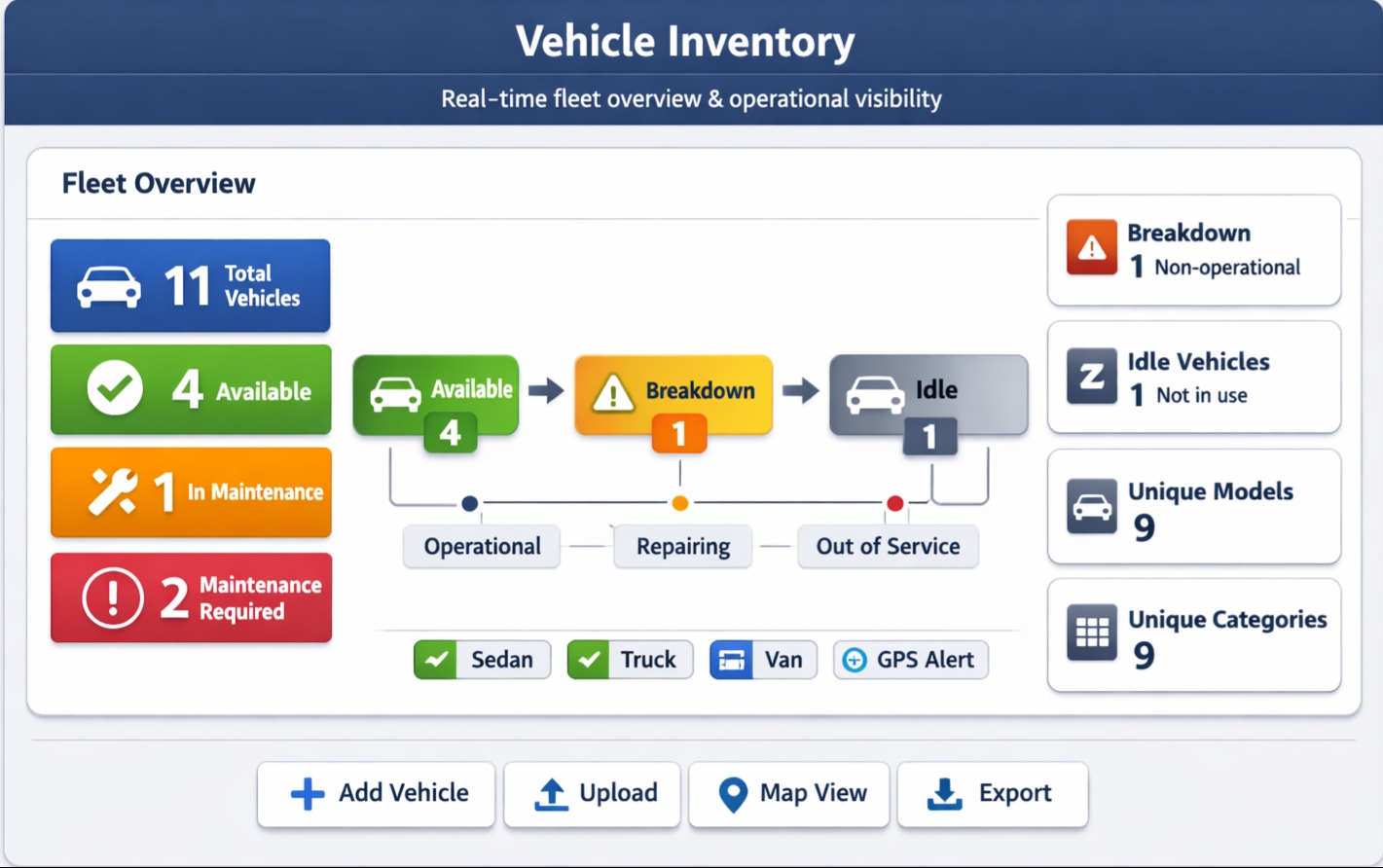
Everything You Need at a Glance
The Vehicle Inventory Dashboard gives you instant visibility into your entire fleet with 8 real-time KPI cards, searchable vehicle table with photos and status badges, one-click filtering, and quick access to detailed vehicle profiles.
8 Real-Time KPI Cards
Total vehicles, available, in maintenance, maintenance required, breakdown, idle, unique models, and categories - all updated in real-time with color-coded indicators.
Interactive Vehicle Table
See vehicle images, numbers, categories, models, meters, status badges, and operators in a sortable, searchable table. Action button on each row for quick access to full vehicle profile.
Quick Actions & Filters
Add new vehicles, bulk upload, switch to map view, filter by status, and export to Excel - all from the main toolbar. Find what you need instantly with powerful search.
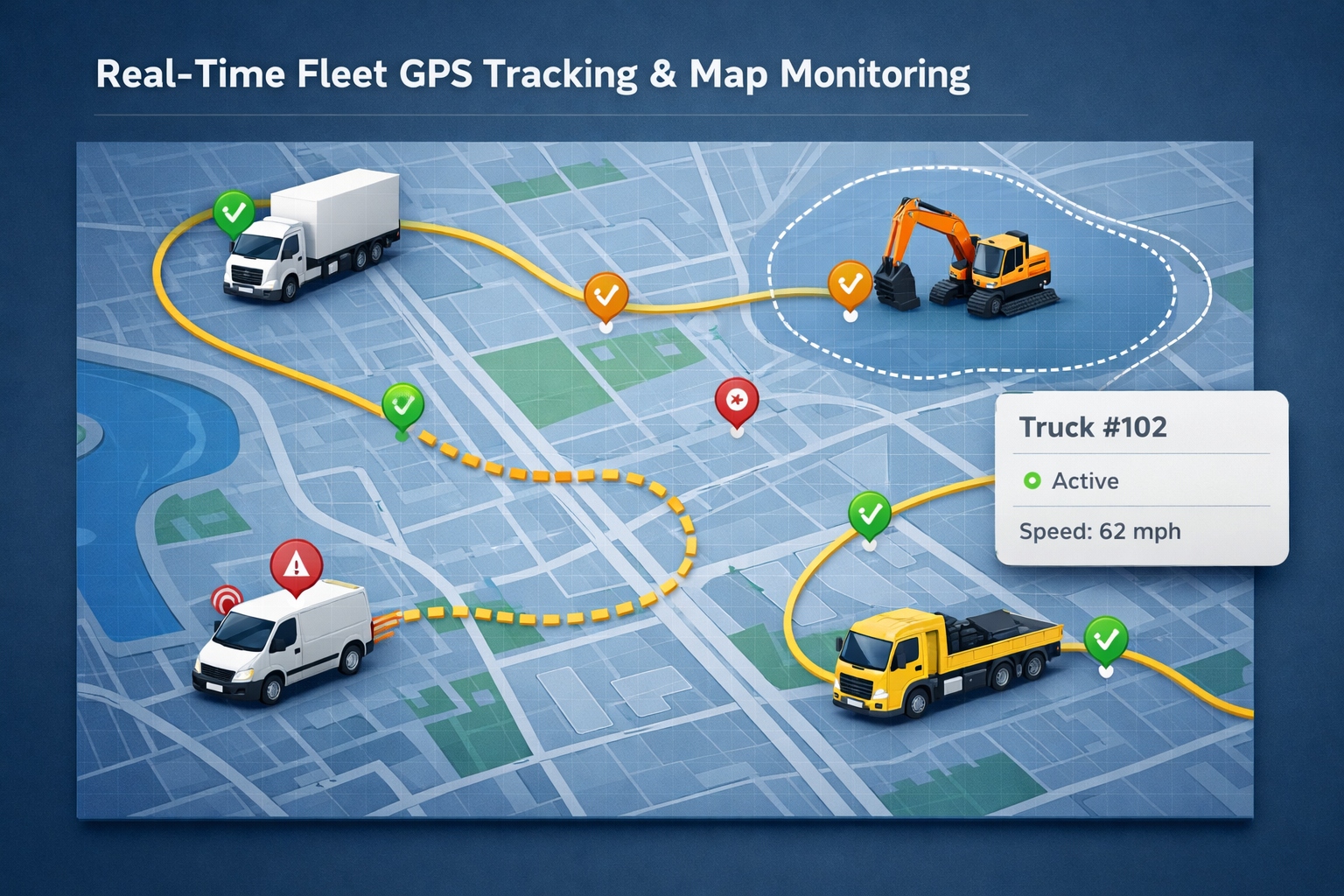
See Your Entire Fleet on One Map
The GPS Location Map View displays all your vehicles in real-time on an interactive map. Color-coded markers show vehicle status. Click any vehicle for instant details including current location, status, operator, and recent activity.
- Real-time GPS tracking - Location updates every 30-60 seconds
- Status-based markers - Color coding for available, maintenance, breakdown, deployed
- Route history - Playback where vehicles have been over time
- Geofence alerts - Get notified when vehicles enter/exit specific areas
- Speed monitoring - Track speeding incidents and idle time
- Filter by status - Show only available vehicles, or only ones in maintenance
Integrates with major GPS/telematics providers or use GPS-enabled mobile devices. Reduce unauthorized use, optimize routes, and improve response times with real-time visibility.
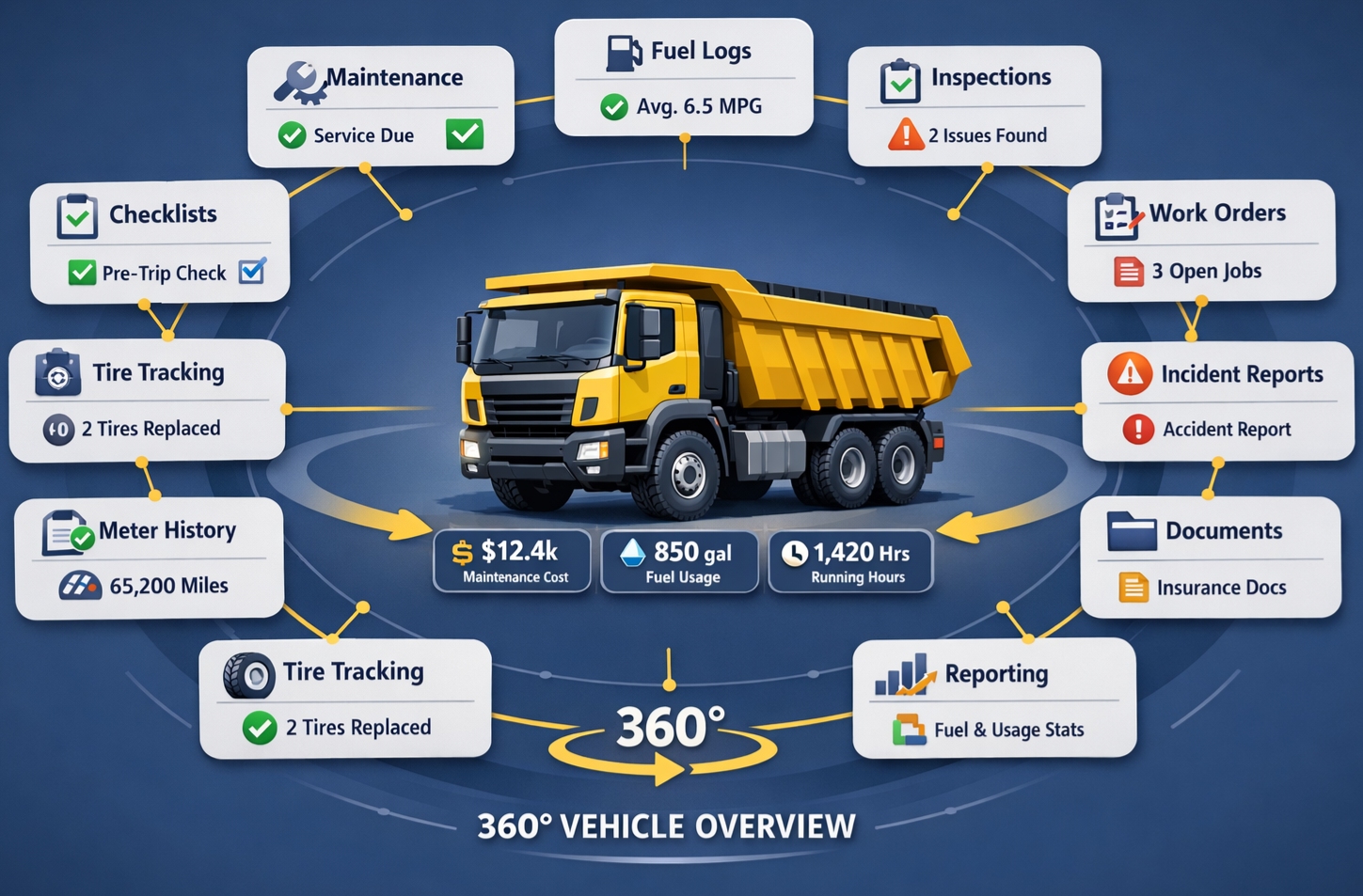
360° Vehicle Overview with 11 Tabs
Click any vehicle to access its complete profile with 11 detailed tabs covering every aspect of vehicle management. Track costs, maintenance, inspections, fuel, incidents, and more - all in one comprehensive view.
- Overview & details
- Meter history
- Inspections
- Work orders
- Tire tracking
- Maintenance schedule
- Incidents & issues
- Fuel logs
- Documents
- Checklists
- Daily reporting
Plus 4 key metrics on the overview tab: Total Maintenance Cost, Total Fuel Cost, Total Fuel Consumption, and Total Running Hours. Issue Report and Work Order Summary sections give you instant status of problems and repairs. Complete history for audits, insurance claims, or resale.
Integrations & Data Management
Connect with your existing systems and manage data your way
Bulk Import/Export
Excel and CSV import with templates. One-click export to Excel or PDF. Bulk update vehicle details. Perfect for data migration or backups.
GPS/Telematics
Integrates with major GPS providers (Geotab, Samsara, Verizon Connect). Auto-sync locations, odometer, hours, and diagnostic codes.
API Access
RESTful API for custom integrations. Webhooks for real-time updates. Connect to your ERP, accounting, or custom systems.
Cloud Storage
Unlimited vehicle photos and documents. Secure cloud storage with automatic backups. Access from anywhere on any device.
Mobile Apps
iOS and Android apps for operators and managers. Complete mobile inspections. Update vehicle status. View real-time dashboard.
Security & Permissions
Role-based access control. Customize who can view, edit, or delete vehicles. Complete audit trails. SOC 2 compliant infrastructure.
Perfect for Any Fleet Size or Industry
Construction
Track excavators, loaders, bulldozers, and other heavy equipment across multiple job sites. Monitor hours, maintenance, and site-specific utilization.
Transportation & Logistics
Manage trucks, trailers, and delivery vehicles. GPS tracking for routing. Compliance tracking for DOT regulations. Fuel cost analysis.
Agriculture
Track tractors, harvesters, and farm equipment. Monitor seasonal usage. Plan maintenance around planting and harvest schedules.
Property Management
Manage maintenance vehicles, trucks, and equipment across multiple properties. Track assignments, costs, and availability.
Manufacturing
Track forklifts, pallet jacks, and material handling equipment. Monitor usage by shift or department. Optimize asset allocation.
Government & Municipalities
Manage diverse fleets including emergency vehicles, public works equipment, and administrative vehicles. Complete compliance documentation.
Join Thousands of Fleets Using HVI
15,000+
Vehicles Tracked
500+
Active Companies
2M+
Inspections Completed
98%
Customer Satisfaction
What Fleet Managers Are Saying
Real feedback from real customers
"The bulk upload saved us days of work. We imported 350 vehicles in under 15 minutes. The GPS map view has stopped unauthorized vehicle use completely. ROI in 3 months."
Marcus Chen
Fleet Director, Construction Corp"The vehicle overview with 11 tabs gives us everything we need. Maintenance costs, fuel logs, work orders - all in one place. The KPI dashboard helped us identify 12 underutilized vehicles."
Jennifer Lopez
Operations Manager, Logistics Inc"Assigning checklists to vehicles during setup was brilliant. Operators know exactly what to inspect for each vehicle type. Failed inspections automatically create work orders. Game changer."
David Miller
Maintenance Supervisor, Transit AuthorityFrequently Asked Questions
Everything you need to know about vehicle management
Three ways: (1) Add vehicles one at a time using the "Add New Vehicle" form with all fields including photos and documents. (2) Bulk upload hundreds or thousands of vehicles using our Excel template - just fill it out and upload, validation happens automatically. (3) Import via API if you're migrating from another system. Most fleets use bulk upload to get started quickly.
The dashboard shows 8 real-time metrics: (1) Total Vehicles - your complete fleet count, (2) Available Vehicles - ready for deployment, (3) In Maintenance - currently being serviced, (4) Maintenance Required - service due soon, (5) Breakdown - non-operational vehicles, (6) Idle Vehicles - not currently assigned, (7) Unique Models - different vehicle models, (8) Unique Categories - different vehicle types. All update in real-time with color-coded indicators.
HVI integrates with major GPS/telematics providers (Geotab, Samsara, Verizon Connect, etc.) via API. Location updates every 30-60 seconds appear on the interactive map. Click any vehicle marker to see status, operator, and recent activity. Set up geofences to get alerts when vehicles enter/exit areas. View route history with playback. Track speed and idle time. Or use GPS-enabled mobile devices without separate hardware. Automatic odometer/hour meter updates eliminate manual entry.
Yes! One-click Excel export from the dashboard exports your complete vehicle list with all fields. Generate custom reports with filters (by status, category, location, date range, etc.) and export to Excel or PDF. Schedule automated reports to run daily/weekly/monthly and email to stakeholders. Export includes photos, documents, maintenance history, costs - everything. Perfect for management review, audits, insurance submissions, or simply backing up your data.
The Vehicle Overview is a comprehensive 360° profile with 11 tabs: (1) Overview - specs, photos, 4 KPI metrics (maintenance cost, fuel cost, fuel consumption, running hours), issue report, work order summary. (2) Meter History - odometer/hour meter readings over time. (3) Inspections - all inspection records. (4) Work Orders - maintenance and repair history. (5) Tires - tire tracking and rotations. (6) Schedule - upcoming maintenance. (7) Incidents - accidents and issues. (8) Fuel Logs - fuel transactions and MPG. (9) Documents - insurance, registration, manuals. (10) Checklists - assigned inspection checklists. (11) Daily Reporting - utilization and activity logs. Complete vehicle history in one place.
Create custom checklists for different vehicle types (pre-op inspection for trucks, safety check for forklifts, etc.). When adding a vehicle, assign one or more checklists - operators will be required to complete them. Checklists show up in the mobile app with pass/fail items, photo capture, notes, and signature. Failed items automatically create work orders. Track completion rates and compliance by vehicle. Require geo-location during inspection to verify vehicles are on-site. Perfect for DOT compliance, safety programs, or preventive maintenance. Different checklists for daily, weekly, or monthly inspections.
Comprehensive fields: Vehicle number, name, VIN, make, model, year, category, meter type (miles/hours/km) and reading, status (9 options), operator, site/project, priority level, ownership mode (owned/leased/rented), asset value, purchase date, warranty expiry, license plate, registration state and expiry, chassis number, manufacturer, last service date and reading, business unit, notes, utilization goal, GPS device ID. Plus unlimited photos and documents. Custom fields for industry-specific needs. Complete lifecycle tracking from acquisition to disposal.
Most fleets are fully operational within hours, not days. Hour 1: Sign up and bulk upload vehicles using our Excel template. Hour 2: Configure categories, statuses, and checklists. Assign checklists to vehicle types. Hour 3: Set up user accounts and permissions. Configure GPS integration if using telematics. Hour 4: Train team via quick video tutorial (15 minutes). Launch mobile app for operators. That's it! Full training takes 30-60 minutes. GPS integration (if needed) typically completes same day. Start seeing benefits immediately. Most customers report ROI within 60-90 days through reduced costs and better utilization.
Start Managing Your Fleet More Effectively Today
Join hundreds of fleets using HVI to reduce costs by 40%, increase utilization by 30%, and gain complete visibility into vehicle operations
14-day free trial • No credit card required • Full feature access